 Sign in Next

 Български
 Čeština
 Dansk
Dansk
 Deutsch
 Eesti
Eesti
 Ελληνικά
 Español
 Français
 Hrvatski
 Italiano
 Latviešu
 Lietuvių
 Magyar
 Nederlands
 Norsk
Norsk
 Polski
 Português
 Română
 Slovenčina
 Slovenščina
 Српски (Ћирилица)
 Suomi
Suomi
 Svenska
 Türkçe
 Русский
 Українська
AI import
AI import allows you to quickly convert a safety data sheet (SDS) from PDF into SBLCore. AI reads the document content and automatically inserts the data into the correct sections of the safety data sheet editor.
Tip! Before importing, make sure the PDF is readable and contains selectable text. If the document is of poor scan quality, AI may not recognise some data correctly.
Procedure
-
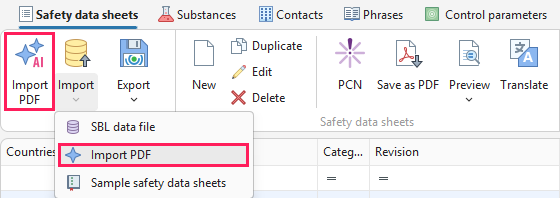
On the Safety data sheets tab, click Import PDF. You can also find the same function under the Import button.
-
Select the safety data sheet in PDF format.
-
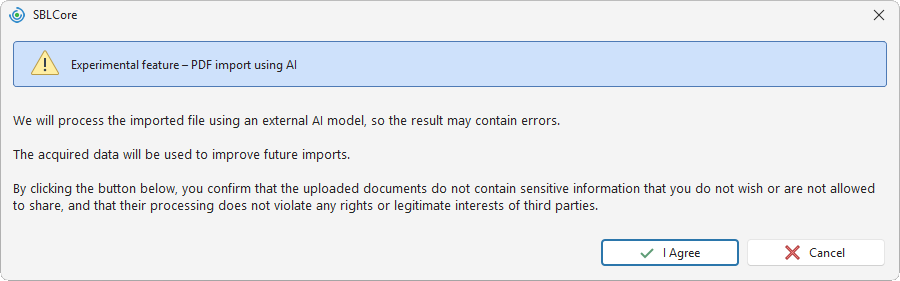
Confirm your consent to data processing. You cannot continue without giving your consent.
By giving your consent, you confirm that:
- your data will be processed by an external AI model,
- we will use your data to improve this feature,
- you are not uploading sensitive information or information that you are not permitted to share.
Note: After you confirm your consent, this notification will not be displayed again for 24 hours.
-
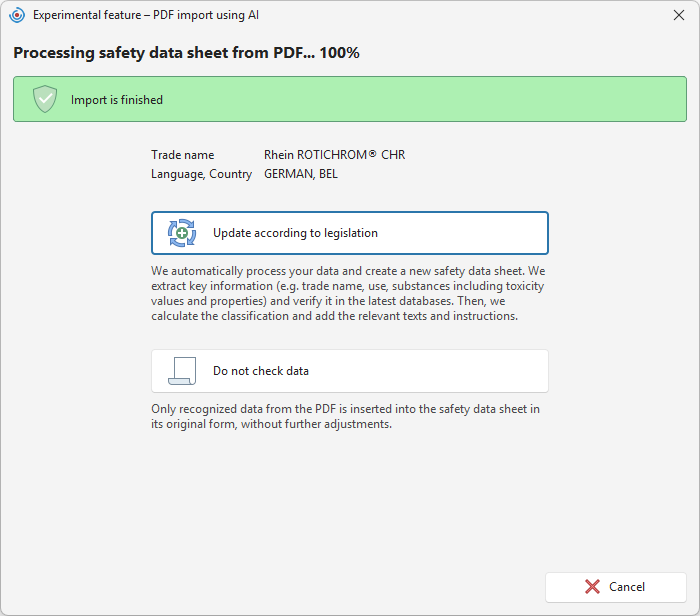
After uploading the file, choose the processing method.
A) Update according to legislation – We will extract key information (e.g. trade name, intended use, substances including toxicity values and other properties) and verify it against the latest databases. If AI detects that some information is outdated, such as substance classifications or control parameters, it will update it according to the current legislation. It will then recalculate the product classification and add the appropriate texts and instructions. This option uses default phrases, allowing you to translate the document into additional languages without manually adding translations.
B) Do not check data – We will import only the data recognised from the PDF without making any further changes. Since the SDS is only converted into the editor and default phrases are not used, you must add any required translations manually.
-
The safety data sheet editor will open. You can find the original document in the attachment.
-
Review the data and modify it if necessary.
Warning! AI import speeds up your work, but it may not recognise all data correctly. After the import, always check the safety data sheet and compare it with the original document.
-
Save the completed safety data sheet by clicking the Save or Save and close button on the toolbar.
Tip! If you upload an SDS in a language that we do not support, we will automatically convert it into English so that you can continue working with it.